Yesterday after watching a video on SEOMoz I noticed them talking about way to get more back links. They were talking about "paying with a tweet" a method in which you give something away but only if the user links to your site via a Facebook Post of Twitter Post. This sounded pretty intriguing to me so I quickly Googled pay with a tweet and found the website paywithatweet.com. Went through the process of creating a button which was pretty simple and at the end gave me some iframe code which I could place on my website.
ohbaby.co.nz is a popular New Zealand Baby Magazine which has articles that are only available to members who subscribe to the print magazine. We decided to add a pay with a tweet to some of these articles in an attempt to get some more back links from social media.
You can see an example by going to Natural Labour Preparation. If you're a "max" member you'll be shown the full story otherwise you will need to subscribe or pay with a tweet. Quite impressed how easy it was to setup, however one issue discovered is that after paying with the tweet the full article is displayed in the pop up window, not ideal because there are no scroll bars, you could paste the address to another window but for the average Internet junkie this might be too hard especially with the address bar greyed out.
Also it would be really cool if the paywithatweet.com website had an api so we could generate the code on the fly and apply the methodology to all our "max" articles so we could have a special weekend where all articles were free with a tweet or facebook post. I presume an api is in the making.
Pay with a tweet a service that I presume might become quite popular.
Anyone else using it? Thoughts/Comments?
Showing posts with label Umbraco. Show all posts
Showing posts with label Umbraco. Show all posts
Wednesday, February 15, 2012

Friday, February 3, 2012
Using the Umbraco Object in a Umbraco 5 Template
If you want to use the Umbraco object in Templates then you need to add @inherits RenderViewPage to the top of your template (View). Its best to do this on a Master Template so you only need to add it once.
If you don't do this you will get an error like CS0234: The type or namespace name 'Field' does not exist in the namespace 'Umbraco' (are you missing an assembly reference?)
If you don't do this you will get an error like CS0234: The type or namespace name 'Field' does not exist in the namespace 'Umbraco' (are you missing an assembly reference?)
Monday, June 22, 2009
Umbraco Tip #2
How to redirect to a nodeid.
Response.Redirect(umbraco.library.NiceUrl());
Example: - Redirect to the same page currently on.
Response.Redirect(umbraco.library.NiceUrl( umbraco.presentation.nodeFactory.Node.GetCurrent().Id));
Response.Redirect(umbraco.library.NiceUrl(
Example: - Redirect to the same page currently on.
Response.Redirect(umbraco.library.NiceUrl( umbraco.presentation.nodeFactory.Node.GetCurrent().Id));
Thursday, April 17, 2008
Creating your first Umbraco User Control - PART 2
In the previous article of this series we learnt how to create a user control in visual studio, upload it to our Umbraco site and then how to display it on our site.
In part 2 we are going to learn how to pass variables from Umbraco back to our User Control.
If you followed part one then great we are going to use the same source code and modify the bits we need to.
Because the New Zealand econonmy has turned to crap and the government is constantly changing the GST rate we'd like to update the GST rate in Umbraco and not in our source code.
1. Open your Umbraco user control in Visual Studio.
2. Last time we had some code like such
This time want to replace this line (double GST = 1.125;) with a dynamic value from Umbraco.
We need create a variable to hold the GST amount eg
private Double gstRate;
3. Next create a public property so we can access it from Umbraco and assign it to the variable we created above. eg
4. Replace double GST = 1.125; with so:
5. Build the soluion and upload to to your Umbraco Bin directory and move to the Umbraco control panel.
6. Go to your developer --> macros and select the Macro you created last time or if you want you can create a new macro.
7. Select the "browse properties" button

8. The public properties in you usercontrol should be displayed in this page

9. Click the parameter tab at the top of the screen and make sure the type selected is text.
10. Save your macro and return to the content page where you are going to place GST Calculator.
11. Insert the macro and you should see the option to input your GST rate.

12. Publish your page and you should be away laughing
13. To edit the rate you can either delete the macro within the page and reinsert it or view the HTML using the html button on the rich text editor and changing the rate manually in their.
Hope you enjoyed this little tutorial - please make any suggestions of tutortial you would like to see! The GST calculator is running live my umbraco site here
You can download a copy of the Visual Studio 2005 version here
In part 2 we are going to learn how to pass variables from Umbraco back to our User Control.
If you followed part one then great we are going to use the same source code and modify the bits we need to.
Because the New Zealand econonmy has turned to crap and the government is constantly changing the GST rate we'd like to update the GST rate in Umbraco and not in our source code.
1. Open your Umbraco user control in Visual Studio.
2. Last time we had some code like such
  double GST = 1.125;
           double Result;
           Result = double.Parse(txtAmount.Text) * GST;
           lblResult.Text = Result.ToString("0.00");
This time want to replace this line (double GST = 1.125;) with a dynamic value from Umbraco.
We need create a variable to hold the GST amount eg
private Double gstRate;
3. Next create a public property so we can access it from Umbraco and assign it to the variable we created above. eg
 public Double _gstRate
        {
            get { return gstRate; }
            set { gstRate = value; }
        }
4. Replace double GST = 1.125; with so:
  Double mutipler;
        mutipler = gstRate / 100 + 1;
        Double Result;
        Result = double.Parse(txtAmount.Text) * mutipler;
        lblResult.Text = Result.ToString("0.00");
5. Build the soluion and upload to to your Umbraco Bin directory and move to the Umbraco control panel.
6. Go to your developer --> macros and select the Macro you created last time or if you want you can create a new macro.
7. Select the "browse properties" button
8. The public properties in you usercontrol should be displayed in this page
9. Click the parameter tab at the top of the screen and make sure the type selected is text.
10. Save your macro and return to the content page where you are going to place GST Calculator.
11. Insert the macro and you should see the option to input your GST rate.
12. Publish your page and you should be away laughing
13. To edit the rate you can either delete the macro within the page and reinsert it or view the HTML using the html button on the rich text editor and changing the rate manually in their.
Hope you enjoyed this little tutorial - please make any suggestions of tutortial you would like to see! The GST calculator is running live my umbraco site here
You can download a copy of the Visual Studio 2005 version here
Thursday, February 7, 2008
Live Customer Helpdesk for Umbraco
This week AxoSoft released its chat client software PureChat, well what can I say this piece of sofware is awesome, took less than a few minutes to get up and running in a project and only about double that time in Umbraco. PureChat is free for 1 operator and as an opening special $5 for 5 operators.
To download PureChat go here
Installation into Umbraco.
- Follow Purchat Instruction first and foremost
- In web.config add value "/PureChat/" to umbracoReservedPaths key
- Move PureChatRequestControl.ascx to the Usercontrol Folder
- I also moved the two image files into the PureChat directory so they were out of the way and keeps things nice and tidy, if you do this then you will need to change values in the PureChat config file.
- Create Umbraco Macro for Chat Client and select UserControl (tick use in editor)
- Add Macro to content page.
Done logon to operator side eg http://localhost/purechat/operator/PureChatOperator.aspx
To download PureChat go here
Installation into Umbraco.
- Follow Purchat Instruction first and foremost
- In web.config add value "/PureChat/" to umbracoReservedPaths key
- Move PureChatRequestControl.ascx to the Usercontrol Folder
- I also moved the two image files into the PureChat directory so they were out of the way and keeps things nice and tidy, if you do this then you will need to change values in the PureChat config file.
- Create Umbraco Macro for Chat Client and select UserControl (tick use in editor)
- Add Macro to content page.
Done logon to operator side eg http://localhost/purechat/operator/PureChatOperator.aspx
Wednesday, February 6, 2008
Integrating YetAnotherForum.net into Umbraco
Tools needed
- Installed Umbraco installation
- Installed YetAnotherForum Application
- Download this (yaf.dll)
How to install YAF
- Download latest release version from www.yetanotherforum.net (Version 1.9.1.6 at time of writing)
- Extract files into any directory
- Rename default.config to web.config
- Configure yafnet.config with connection to MSSQL database you want to use (tables use a yaf_ naming connection so should be any problems using Umbraco database, however I put it on a separate database)
- Create an application through IIS pointing to the directory where YAF is located.
- Run application and run through install.
Integrate YAF into existing Umbraco Installation
- Copy bits from web.config (YAF directory) to Web.config (Umbraco Installation)
- Copy directories and files from yaf directory to umbraco directory (don’t need default.aspx) as you can see this can get a bit messy
- Copy yaf.dll downloaded before into Bin directory.
- Create a new UserControl (forum.ascx)
- Upload usercontrol to umbraco usercontrol directory
- Create a new Umbraco macro and select the forum.ascx
- Insert into Umbraco template.
- Create a new page called Forum (if you don’t want to call the page Forum you need to download the 1.9.1 YAF source and change the file Classses\UrlBuilder.cs)
- Installed Umbraco installation
- Installed YetAnotherForum Application
- Download this (yaf.dll)
How to install YAF
- Download latest release version from www.yetanotherforum.net (Version 1.9.1.6 at time of writing)
- Extract files into any directory
- Rename default.config to web.config
- Configure yafnet.config with connection to MSSQL database you want to use (tables use a yaf_ naming connection so should be any problems using Umbraco database, however I put it on a separate database)
- Create an application through IIS pointing to the directory where YAF is located.
- Run application and run through install.
Integrate YAF into existing Umbraco Installation
- Copy bits from web.config (YAF directory) to Web.config (Umbraco Installation)
- Copy directories and files from yaf directory to umbraco directory (don’t need default.aspx) as you can see this can get a bit messy
- Copy yaf.dll downloaded before into Bin directory.
- Create a new UserControl (forum.ascx)
<%@ Control Language="C#" ClassName="WebUserControl1" %>
<%@ Register TagPrefix="yaf" Namespace="yaf" Assembly="yaf" %>
<%@ Register TagPrefix="yc" Namespace="yaf.controls" Assembly="yaf" %>
<form id="Form1" runat="server" enctype="multipart/form-data">
 <yaf:forum runat="server" id="forum" />
</form>
- Upload usercontrol to umbraco usercontrol directory
- Create a new Umbraco macro and select the forum.ascx
- Insert into Umbraco template.
- Create a new page called Forum (if you don’t want to call the page Forum you need to download the 1.9.1 YAF source and change the file Classses\UrlBuilder.cs)
Thursday, January 31, 2008
Creating your first Umbraco User Control - PART 1
1. Start a new asp.net web application in Visual Studio. You can name in whatever you like, in this sample project I have called it UmbracoModules. When creating new modules for my umbraco installation I have in the past tended to create 1 project for all the new user controls, not a single instance for each new control.
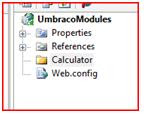
2. Create a new folder in the solution explorer that explains the name of the control.
3. Add a new Web User Control to the folder you just created
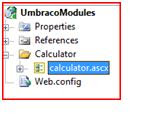
4. Design your .ascx file the same way you normally design a .aspx page, in this example we are going to take 1 input field and the calculate the GST amount, in New Zealand the GST amount is 12.5%
6. Build the project
7. We now need to copy the files we just created to the Umbraco installation either by copy paste or using FTP. Copy the calculator.ascx file to usercontrols directory and the UmbracoModules.dll to the bin directory.
8. Create a new Marco in the Umbraco control panel.
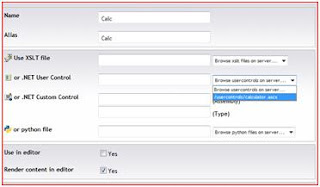
You should see your user control in .net user control drop down list, if you select this, also tick Use in Editor and click save.
9. All left to do is to add the user control to any pages you want it to appear on. Go to the content tab in Umbraco, select the page you want then hit the insert macro button on the nav bar, you should see you macro appear.
10. YOUR DONE!
In part 2 we will see how to pass variables from Umbraco back to your user control.
2. Create a new folder in the solution explorer that explains the name of the control.

3. Add a new Web User Control to the folder you just created

4. Design your .ascx file the same way you normally design a .aspx page, in this example we are going to take 1 input field and the calculate the GST amount, in New Zealand the GST amount is 12.5%
Amount <asp:TextBox ID="txtAmount" runat="server" />
<asp:Button ID="btnSubmit" Text="Submit"  runat="server" /> <br />
<asp:Label ID="lblResult" runat="server" />
5.    Create a click event for the Submit button
    protected void btnSubmit_Click(object sender, EventArgs e)
        {
           double GST = 1.125;
           double Result;
           Result = double.Parse(txtAmount.Text) * GST;
           lblResult.Text = Result.ToString("0.00");
        }
6. Build the project
7. We now need to copy the files we just created to the Umbraco installation either by copy paste or using FTP. Copy the calculator.ascx file to usercontrols directory and the UmbracoModules.dll to the bin directory.
8. Create a new Marco in the Umbraco control panel.

You should see your user control in .net user control drop down list, if you select this, also tick Use in Editor and click save.
9. All left to do is to add the user control to any pages you want it to appear on. Go to the content tab in Umbraco, select the page you want then hit the insert macro button on the nav bar, you should see you macro appear.
10. YOUR DONE!
In part 2 we will see how to pass variables from Umbraco back to your user control.
Thursday, December 6, 2007
Umbraco + Bulk Adding New Pages
Recently I have been working on a new website for a Kennel Club organisation.
Our choice of CMS was Umbraco, i had personally never used Umbraco, but a few hours into the install and everything was going pretty well.
After doing some searches on the Umbraco forums and Google i didn't seem to find any facility to bulk load pages. Its quite possible one already exists and I just haven't found it. Anyway I thought this might be a good idea so I could gain a better understanding of how the Umbraco structure works. By trade I am very junior asp.net(vb.net) programmer, have little knowledge of XML and no previous experience with C#. So there's the disclaimer continue on at your own risk.
Click here to download the files you are going to need.
Our choice of CMS was Umbraco, i had personally never used Umbraco, but a few hours into the install and everything was going pretty well.
After doing some searches on the Umbraco forums and Google i didn't seem to find any facility to bulk load pages. Its quite possible one already exists and I just haven't found it. Anyway I thought this might be a good idea so I could gain a better understanding of how the Umbraco structure works. By trade I am very junior asp.net(vb.net) programmer, have little knowledge of XML and no previous experience with C#. So there's the disclaimer continue on at your own risk.
Click here to download the files you are going to need.
- Bukimport.aspx needs to be saved into your umbraco directory (the same one that has create.aspx in it)
- Bulkimport.dll needs to be saved to the BIN folder.
- Book1.xls is a example of excel file of your new pages
What the Bulk Import will do:
- It will create new nodes for the pages you specify
- It can publish your new documents (can be turned off)
- You can choose which node the pages will be created into
- You can choose the document type
What the Bulk Import won't do (yet)
- It will not assign any macro properties to the new document (eg Hide from nav)
- It will not add any content to the new document (its all about creating structure at the moment)
- It will not restrict your document types (eg if you have a master document type which doesn't allow children nodes then you will still be able to add child pages)
Right given that some interest is shown then if you want these above options implemented please let me know. The content for my Dog Breed pages have not yet been constructed so I have no need to bulk import content.
The screens are very ugly and confusing at the moment but that's not that point at the moment i just need some people to test this!
Obviously at the top of the page is import which you can import a new excel file its put into the same directory as bulkImport.xls hopefully you have rights I probably should change this to usercontrols or something anyhow that's where it is for now.
Controls on the page
Parent node is obviously the parent node of the new page you are going to create, you can also select any node which is higher on the grid (because it will be inserted first and we will therefore then know the Node ID)
The dropdownlist below the Grid allows you to change the parent Nodes for all pages in the grid.
Import obviously imports the new pages. May take some time depending on how many nodes you create. I imported 200 took about 30second from memory. You will be able to tell its done when the new nodes ID's are shown
Good luck and feedback would be good.
Skiltz
Subscribe to:
Posts (Atom)